



OLFolderSync

OLFolderSync can synchronize any Microsoft® Outlook® folder with anyone else’s.
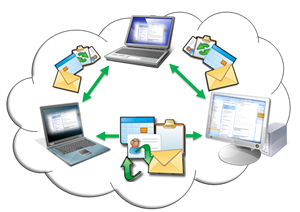
If at home or at work – it is often necessary to keep Outlook appointments, contacts, tasks, E-mails and other Outlook data synchronized on several computers. This Outlook Add-In allows you to do just this. The folders you allow to be synchronized will do so in the background by e-mail. You can easily synchronize Outlook folders through the internet without the need for both parties to be online at the same time.
If you have private data elements in Outlook you can exclude them from the synchronization process. It is also possible to synchronize only objects of a user defined category.
The installation is straightforward. In order to install and use this application you only need your Outlook to be configured with an e-mail account (POP3). After completing the install ation you will find a new property tab under each Outlook folder, where you can administrate the synchronization features. In order to configure the Add-In you only enter an access key and the e-mail address of your synchronization partner. The data transfer can be protected with a password.
OLFolderSync is very convenient to:
- Synchronize your Outlook appointments, contacts and tasks through internet by e-Mail.
- Let your PA add and amend appointments, tasks or other Outlook objects while being on the other side of the world.
- Synchronize birthday dates with friends and family.
- Work in a team with a synchronized Outlook calendar, tasks and other documents.
- Synchronize Outlook data on your laptop with your desktop.
- Synchronize your appointments with those of your field representatives.
- Synchronize club/association schedules with that of other members.
- Facilitate schedules to team members.
Minimum system requirements:
Windows 2003, XP, Vista, Windows 7, 8 or 10 and Microsoft® Outlook® 2002 2003 2007 2010 2013 or 2016
Download
Download a free, fully functional 30-day trial version:
Download x86 version:
Download x64 version:
Attention: Please do only use version x64 if you also have a 64-Bit Office.
Download all versions:
Order:
Advantages
- Sync all Outlook types.
- You can synchronize up to 50 folders.
- It will synchronize also Outlook-forms during its basic sync process.
- OLFolderSync has a version control, so you can't overwrite data from other users.
- You can filter your synchronization by category or other attributes.
- Sync-mails can be crypted.
- OLFolderSync collects changes together in one mail, if needed.
- You can assign categories to users.
- OLFolderSync can log everything in the journal.
- You can synchronize also Exchange folders.
- You can add one category to each of the synchronized items.
- You can choose the mail account used by OLFolderSync.